A Pinterest blogging strategy sounds simple at first. You just make some nice images, link them to your blog, and wait for traffic. That’s what I thought too. But once I actually started doing it, things didn’t go that smoothly at all.
I spent the first two months doing it completely wrong. I posted inconsistently, used horizontal images, wrote zero pin descriptions, and wondered why nobody was clicking. When I finally figured out what Pinterest actually wants — and more importantly, how people actually use it — things started to shift.
Here’s what works. And some of what doesn’t.
First, Understand What Pinterest Actually Is
Most people treat Pinterest like Instagram. It’s not.
Pinterest is a search engine. People go there with intent — they’re looking for something specific. A dinner idea. A bedroom color. A budget spreadsheet template. They type it in and browse results, just like Google.
That matters because it changes your whole approach. On Instagram, you chase followers and hope the algorithm shows your post to people. On Pinterest, you optimize so people find you when they search.
Your blog posts need to be attached to content people are actively looking for. Not just “things I feel like writing about today.”
Building a Pinterest Blogging Strategy That Actually Works
Start With Keyword Research — On Pinterest Itself
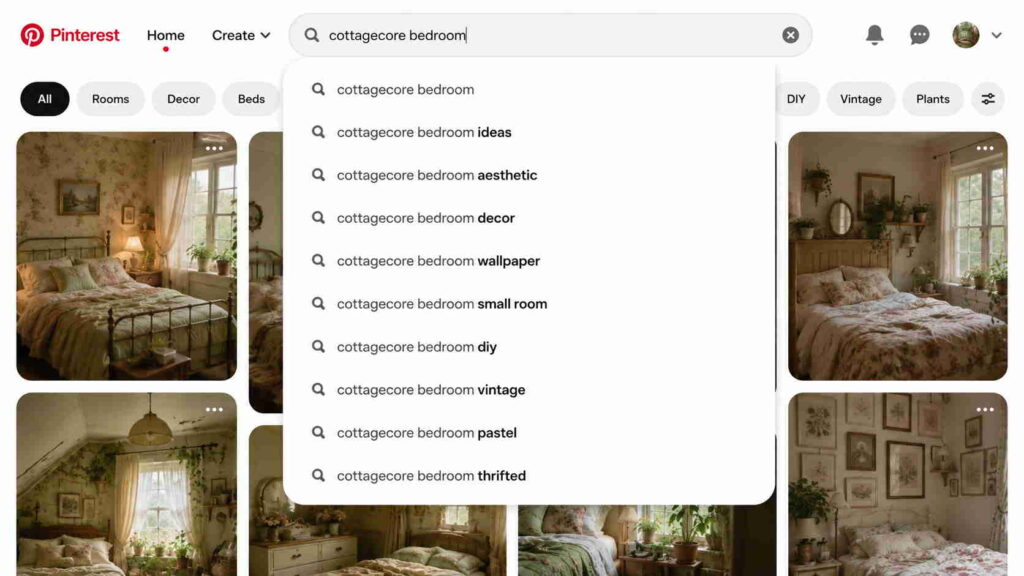
This part gets skipped constantly. People just pin their posts and hope. But taking 20 minutes to understand what people actually search on Pinterest is probably the highest-leverage thing you can do early on.
Here’s a simple method: go to the Pinterest search bar and start typing your topic. Pinterest auto-suggests popular searches below. Those suggestions are real searches real people are making.
For example, type “meal prep” and you’ll see things like:
- meal prep for the week
- meal prep ideas for beginners
- meal prep lunches healthy
Those are your content ideas. Write blog posts around those exact phrases, then create pins linking to them.
This is the part where a lot of new bloggers feel like they’re just copying other people’s ideas. You’re not — you’re matching what your audience is already looking for. There’s a difference.
Pin Titles and Descriptions Actually Matter
Most people write a pin title, skip the description, and call it done. That’s throwing away free optimization.
Pinterest uses the description to understand what your pin is about. The more relevant, natural text you write, the more likely your pin shows up when someone searches for that topic.
Don’t stuff keywords in robotically. Just write like you’re explaining the pin to a friend:
“Made this freezer meal prep guide after realizing I was spending way too much time cooking on weeknights. It covers 10 easy meals you can batch-make in about two hours — links to the full recipes on the blog.”
That’s it. Real language. Mentions the topic naturally. Easy to write.
The title of the pin (the text on the image itself) should also be clear and specific. “Easy Weeknight Dinners” is fine. “10 Freezer Meals You Can Make in 2 Hours” is better. Specificity wins.
The Image Design Problem Nobody Talks About Enough
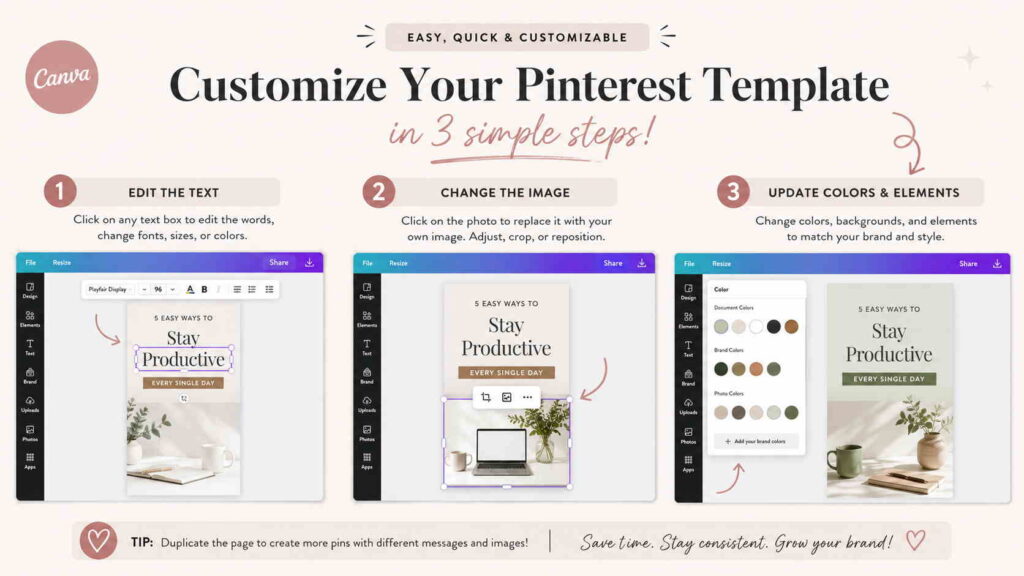
Okay, here’s a frustrating one.
You can have a great blog post, a great pin description, and a perfect keyword — and still get almost no clicks because the image is wrong.
Pinterest is visual. The image is the first impression. If it doesn’t look good at thumbnail size, people scroll past it. Full stop.
What tends to perform:
- Vertical images (2:3 ratio — 1000x1500px is standard)
- Easy-to-read text overlay — big, clear, not too many words
- Warm or bright colors — dark images tend to disappear in the feed
- A clear “what you’ll get” message — not just the topic, but a hint of the value
What usually fails:
- Horizontal images (they look tiny in Pinterest feeds)
- Fancy cursive fonts that nobody can read at thumbnail size
- Images that look like ads (people scroll past ads instinctively)
- No text on the image at all
Canva has free Pinterest templates. Use them as a base, adjust the colors to match your brand, and change the text. You don’t need to design from scratch every time.
One thing I found surprising: simpler images often outperform fancy ones. A plain background with bold text sometimes gets more saves than a beautifully designed graphic. Worth testing both.
How Often Should You Pin?
Honestly, there’s no magic number. But consistency matters more than volume.
Pinning 50 things one day and nothing for three weeks doesn’t work. Pinterest’s algorithm rewards accounts that stay active over time.
A reasonable starting point: 10–15 pins per day. That sounds like a lot, but it includes repinning other people’s content — not just your own. Mixing in other people’s pins keeps your boards active and makes your profile look more like a real curator than a self-promotion machine.
For your own blog posts: aim to create 2–5 fresh pins per blog post. Same post, different images, slightly different titles. Some will perform better than others, and you won’t know which until you test.
Tailwind is a scheduling tool that a lot of bloggers use. You can schedule pins weeks in advance in one sitting. It has a free trial, worth checking if the manual process feels unsustainable.
The Blog Post Side of the Equation
Pinterest can send traffic to your blog — but only if the blog post delivers what the pin promised.
A pin that says “10 Ways to Save $500 This Month” needs a blog post that actually covers 10 concrete, useful ways to save $500. Not a generic financial advice article with five vague tips.
High bounce rate (people clicking in and leaving immediately) hurts your Pinterest performance over time. The platform pays attention to whether people engage with your content or immediately leave.
So the quality of the blog post matters, not just the pin.
Pinterest vs. Google: Which Should You Focus On First?
Both, eventually. But for new bloggers, Pinterest can bring traffic faster.
| Google (SEO) | ||
|---|---|---|
| Time to see results | 3–6 months | 6–18 months |
| Traffic type | Visual search intent | Text search intent |
| Content longevity | Pins can rank for years | Articles can rank for years |
| Skill needed | Image design + keyword research | Writing + technical SEO |
| Free to use | Yes | Yes |
| Paid acceleration option | Pinterest ads | Google ads |
Pinterest doesn’t replace SEO. Google traffic is more valuable long-term because it’s higher intent and harder to knock off once you’re ranking. But Pinterest is a faster entry point when your domain is new and Google barely knows you exist yet.
A lot of food bloggers, DIY creators, and personal finance writers built their audiences almost entirely on Pinterest before Google started paying attention to their sites. That’s a real path.
What Makes a Good Board Setup
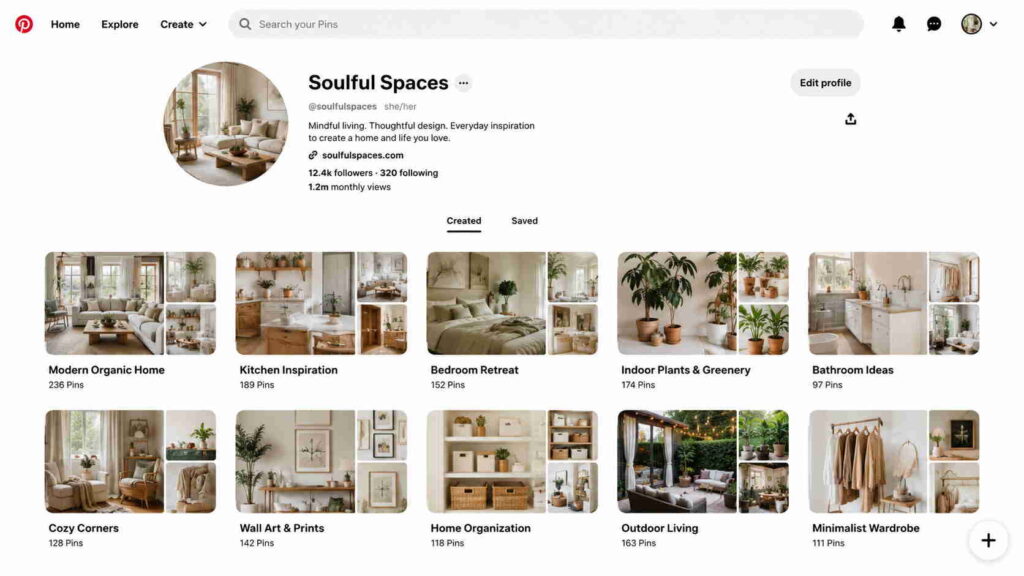
Boards are the containers your pins live in. They need to be specific and searchable.
“My Blog Posts” is a bad board name. “Healthy Meal Prep for Beginners” is much better.
A few principles:
- Name each board after what someone would actually search for
- Write a board description with natural, relevant language
- Keep boards focused on one topic — don’t mix recipes and home decor in the same board
- Have at least 10–20 pins in a board before making it public
One mistake I kept making early on: creating boards and leaving them half-empty. An empty board looks abandoned. Fill it before you share it.
Pros and Cons of Using Pinterest for Blog Traffic
Might as well be honest about both sides.
What works well:
- Long content lifespan — a good pin can bring traffic for 2+ years
- No need for a big following to get reach (unlike Instagram)
- Very visual niches (food, home, fashion, finance graphics) perform extremely well
- Once set up, traffic becomes somewhat passive
What feels frustrating:
- Results take months — the first 60–90 days can feel like nothing is happening
- You have to keep creating fresh pins regularly — it’s not fully set-and-forget
- Design takes time, especially if you’re not comfortable with Canva or similar tools
- Some niches just don’t do well on Pinterest (B2B topics, most tech content, anything that doesn’t translate to an image)
Who benefits most: Food bloggers, home decor writers, personal finance creators, DIY crafters, recipe sites, travel blogs, fashion bloggers.
Who probably shouldn’t bother: Software companies, B2B service businesses, news sites, highly technical niches without a visual component.
What Takes the Longest (And Why People Quit Too Early)
This is real: most bloggers quit Pinterest around month two or three. Nothing seems to be working. Impressions are low. Clicks are basically zero.
Then around month four or five, something shifts. A few pins start showing up in search. People start saving them. Traffic ticks up. By month six, you might actually have something meaningful.
The accounts that keep going past the frustrating early phase are the ones that eventually see results. The ones that quit at month two never find out.
That’s not motivational fluff — it’s just the pattern. Pinterest compounds. Early effort pays off later, not immediately.
Set a realistic target: post consistently for six months before deciding whether it’s working for your blog.
A Simple Starter Routine
Nothing complicated. Something like this:
Week 1:
- Set up a Pinterest business account
- Create 5–8 boards with specific, searchable names
- Do keyword research in the Pinterest search bar for your niche
- Write descriptions for each board
Week 2 onward:
- Create 2–3 pins per existing blog post
- Pin your content + repin 5–10 relevant pins from others daily
- Track which pins get saves and clicks in Pinterest Analytics
Month 2:
- Identify which pin designs get more engagement
- Make more of those
- Start creating new blog posts around keywords you found in Pinterest search
It’s not complex. It’s just consistent.
Conclusion
There’s no single trick to making Pinterest send traffic to your blog. The accounts that do well are doing a bunch of small things right — consistent pinning, good images, specific keywords, solid blog posts behind the pins.
The part most people miss isn’t any one tactic. It’s just staying consistent long enough for the compounding to kick in.
Start small. Get one board fully set up. Create three pins for your best blog post. See what happens over the next few months. Then build from there.
Read More: How Pinterest Affiliate Marketing Actually Works for Beginners
FAQ
Q: How long before Pinterest sends real traffic to my blog?
Realistically, 3–6 months of consistent pinning. Some accounts see movement earlier. Some take longer. Month one and two are almost always slow./p>
Q: Do I need a lot of followers on Pinterest to get blog traffic?
No. Pinterest reach is based on search and saves, not follower count. An account with 200 followers can get significant traffic if the pins rank well in search.
Q: How many pins should I post per day?
Most advice suggests 5–15 pins per day for growth. Quality matters more than quantity. Ten well-designed pins with good descriptions beat fifty rushed ones.
Q: Should I use hashtags on Pinterest?
Hashtags on Pinterest are less important than they used to be. They don’t hurt, but they’re not the focus. Keywords in your pin title and description matter much more.
Q: What niches work best for Pinterest blog traffic?
Food, home decor, DIY, personal finance, parenting, fashion, travel, and health. These are the sweet spots. If your blog is in one of these areas, Pinterest is worth real effort.